
AVAX Blood Pressure Diary
AVAX HealthMedical
4.4172.00 Reviews
- Version
- 8.5.1
- Installs
- 500.00K
- Age Rating
- Everyone
Screenshots
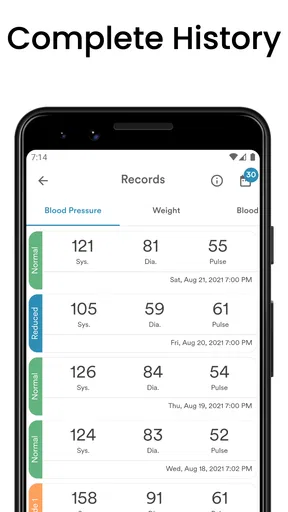
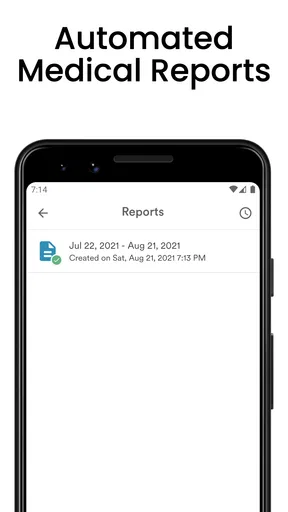
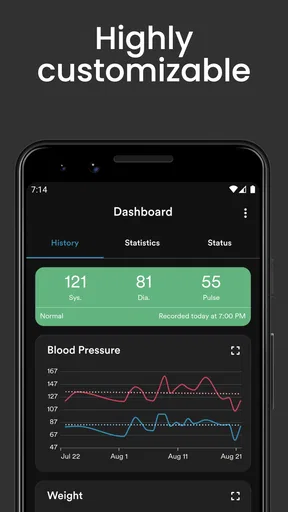
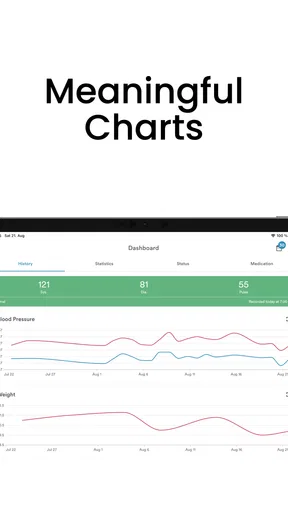
Our Review of AVAX Blood Pressure Diary
 Analysis by Appyee
When I’m tracking a health measurement over several days, the tricky part is rarely taking one reading; it’s keeping the record consistent enough to be useful later. That’s the job I’d give AVAX Blood Pressure Diary: a focused medical app for logging blood pressure and looking back at the pattern, rather than a replacement for a monitor or a clinician. Its usefulness depends on a small routine—take a reading properly, record it, and make the history available when you need it.
Where the network fits into a simple diary
Connectivity matters most when an app is doing something beyond holding a number on screen. In this diary, the clearest network-adjacent task in the published experience is preparing and sharing a report for a healthcare appointment. I would treat that as a practical handoff: check that the readings and dates look right, create the report when needed, and make sure I can access it in time to share it. The record itself is only as useful as the care taken when entering it.
That distinction is worth keeping in mind if you expect a blood pressure app to behave like a live health dashboard. AVAX is centered on a personal log and its summaries, not on replacing medical advice or monitoring you continuously. I wouldn’t rely on it to alert me to a health emergency, and I’d follow a clinician’s instructions rather than wait for an app chart to tell me what to do.
AVAX Health develops the app, which is free to install and intended for everyone. It has a 4.6 average from around 10,000 ratings and more than 500,000 installs. The current version is 8.4.5, and it requires Android 8.0 or later. Those figures suggest a well-established option, but they don’t tell me whether its workflow will suit every person; that depends more on how you measure and what you need to do with the record.
A routine that works in real life
For someone who takes readings at home, the diary is most helpful when it becomes part of the same routine as the measurement. I’d sit down, use the monitor according to its instructions, then enter the result rather than trying to remember several numbers at the end of the day. If I were asked to keep a log for an appointment, I’d also make a habit of checking that each entry has landed in the history before moving on.
A realistic example: you measure before breakfast on several mornings, but one day you’re in a hurry and take the reading after moving around. The app can preserve what you entered, but it can’t make those circumstances equivalent. I’d add a brief note when context matters, if the app provides a suitable place to do so, and otherwise keep a separate note rather than imply that the reading was taken under the usual conditions. That small distinction can make a history more honest and easier to discuss.
Reminders can help establish a cadence, especially when readings are easy to forget during a busy week. I’d set them around a time when I can actually pause and measure, not simply choose the most convenient notification slot. A reminder that arrives while commuting or working may be dismissed repeatedly; a less ambitious schedule that fits the day is more likely to become a lasting habit.
What to check before sharing a report
Exporting a PDF is a useful bridge between a private diary and a medical conversation. Before an appointment, I’d review the date range and scan for missing or mistyped entries instead of assuming the file is automatically a complete clinical record. If the readings are meant to follow a particular schedule, I’d ask the healthcare professional what period and timing would be most helpful, then use that guidance consistently.
This also answers a common practical question: does an app report replace bringing the monitor or discussing symptoms? No. A report can make a conversation more organized, but it is still a record of entered readings, not a diagnosis. I’d bring the monitor’s details or ask the clinician what they want to see, and I’d never delay urgent care because an app has not produced a trend or report.
There is a trade-off in keeping a record on a phone. It is convenient to carry and review, but health information deserves care. I’d use a device lock, avoid leaving a report open where others can see it, and share the PDF only with the person or clinic that needs it. Before relying on any health app for long-term recordkeeping, I’d also check its current privacy information and account options directly in the app and store; privacy practices can change, so assumptions are not a substitute for reading them.
Using AVAX as a personal blood pressure log
Hey there! Today, I’m diving into the world of health apps with a closer look at AVAX Blood Pressure Diary. If you’re anything like me, keeping track of your health metrics can feel like a daunting task. But with the rise of mobile health apps, it’s becoming easier to stay on top of things, and AVAX is here to lend a hand—or should I say, a pulse?
Getting Started with AVAX Blood Pressure Diary
First things first, downloading and setting up AVAX Blood Pressure Diary is a breeze. Available on both Android and iOS platforms, you can find it on your app store of choice. Once installed, the initial setup is straightforward. You’ll be prompted to enter your personal information such as age, weight, and height to tailor the app’s functionalities to your specific needs. It’s like having a mini medical assistant in your pocket.
The user interface is clean and intuitive, which I absolutely love. You don’t have to be a tech wizard to navigate through the app. Everything is laid out in a way that makes sense, and the vibrant color scheme keeps things engaging without being overwhelming. It’s a fine balance that AVAX has nailed.
Tracking Your Blood Pressure
Now, let’s talk about the heart of the app—tracking your blood pressure. Entering your readings is as simple as pie. Just tap the ‘Add’ button, and you can manually input your systolic and diastolic numbers, along with your pulse rate. If you’re using a compatible Bluetooth monitor, the app can sync your data automatically, which is a fantastic feature for those who want to save time.
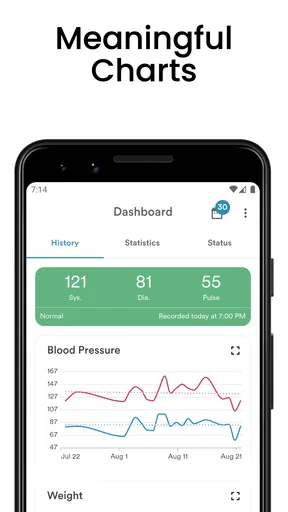
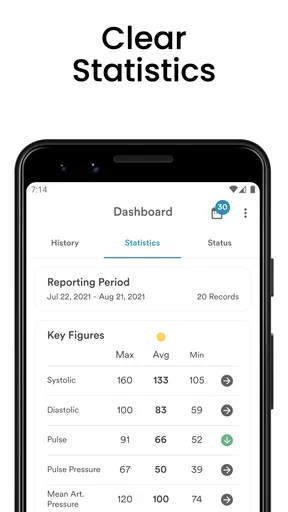
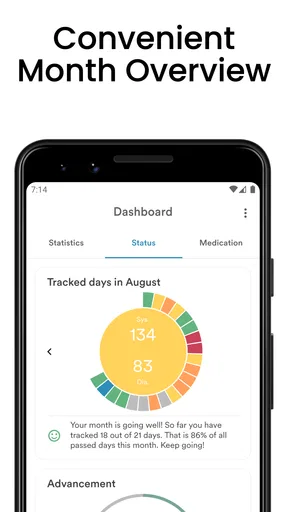
Once your data is in, AVAX doesn’t just let it sit there. Oh no, it transforms it into easy-to-read charts and graphs. You can view your trends over time, which is super helpful for spotting any concerning patterns. The visualization tools are incredibly insightful, allowing you to take proactive measures if something feels off.
Choosing between manual entry and Bluetooth
The choice between typing numbers and using a compatible Bluetooth monitor is really about consistency and convenience. Manual entry makes the diary usable with a wider range of devices, but it adds one more chance to transpose a digit or forget a reading. I’d enter the numbers immediately and compare them with the monitor display before saving. Automatic syncing can cut down that friction, though I’d still verify that the reading appears in the history rather than assuming a successful connection means the record is complete.
Bluetooth is not automatically the better option for every household. If more than one person uses a monitor, take care not to assign someone else’s reading to your own record. If the monitor is not compatible or pairing becomes a repeated distraction, manual entry may be the more dependable routine. The best method is the one that produces an accurate, regularly maintained log—not the one with the fewest taps.
Features That Stand Out
One of my favorite features has to be the reminder system. Let’s face it, life gets busy, and remembering to check your blood pressure can slip through the cracks. With AVAX, you can set up reminders so you’ll never miss a reading again. The notifications are gentle nudges rather than annoying alarms, which is a thoughtful touch.
Another standout feature is the ability to export your data. At your next doctor’s appointment, you can bring along a detailed report of your readings. The app allows you to export your data in a PDF format, making it easy to share with your healthcare provider. It’s like having a personal health journal at your fingertips.
Comparing it with other ways to keep a record
Compared with a paper notebook, a digital diary can make it easier to review a run of readings as charts and prepare a shareable report. Paper, however, works without charging a phone or navigating menus and can be a perfectly sensible choice for someone who prefers handwriting. A spreadsheet offers more control over columns and calculations, but it asks the user to build and maintain that structure. AVAX sits between those approaches: more purpose-built than a blank sheet, while still relying on the user to measure and record carefully.
It is also different from a general wellness app that gathers many kinds of health information. A focused blood pressure log can be less cluttered for someone whose main task is tracking readings, but it may not suit a person who wants one central place for all health data. The original review’s wish for broader integration remains a meaningful limitation: if you already organize your health information through another platform, check whether AVAX fits that workflow before making it your main record.
What Could Be Improved?
While AVAX Blood Pressure Diary is pretty comprehensive, there’s always room for improvement. Personally, I’d love to see more integration with other health apps. Right now, the data stays within AVAX, but it would be awesome if it could sync with platforms like Google Fit or Apple Health. That way, all your health data could be centralized in one location.
Also, a little more customization in the reminders would be great. While the current system is functional, having the ability to set custom reminder tones or adjust the frequency of alerts could enhance the user experience even further.
There is another practical limitation to consider: charts are only as representative as the entries behind them. An occasional missed measurement or a change in routine can make a line look more complete or comparable than it really is. I’d use the visual summaries to notice questions worth raising, not to diagnose a condition or change medication. If a value seems worrying, follow the advice of a healthcare professional and the monitor’s instructions rather than treating the app’s presentation as medical judgement.
The app is free to download, while in-app purchases range from $2.99 to $104.99 per item. I’d look at the purchase details in context before committing to anything: a basic diary may be enough for someone who only wants to keep a record, while a user considering paid options should first decide which specific need they are trying to solve. The existence of purchases does not make them necessary for every user, and I wouldn’t pay simply because the app is health-related.
Who will get the most from it
I’d recommend this kind of focused diary to someone who already has a blood pressure monitor and has been asked to keep a home record, or to a person who wants to bring a more organized history to routine care discussions. It is also a reasonable fit for someone who appreciates charts and reminders more than a handwritten notebook. The most useful habit is to make entries close to measurement time and keep the same routine whenever possible.
I’d steer someone elsewhere if they need a clinician-supervised monitoring service, automatic interpretation, or a single hub that consolidates data from many health products. I’d also hesitate to recommend a phone-based log to someone who finds notifications stressful or has difficulty using a smartphone; a paper record, maintained carefully and reviewed with a clinician, may be easier. The app should support the user’s care plan, not add pressure or stand in for professional support.
Final Thoughts
Overall, AVAX Blood Pressure Diary is a solid choice for anyone looking to keep tabs on their blood pressure. It’s user-friendly, packed with useful features, and offers valuable insights into your health patterns. Whether you’re managing hypertension or just want to maintain a healthy lifestyle, this app is a trusty companion.
So, if you’re ready to take control of your health, why not give AVAX Blood Pressure Diary a try? It’s a small download with a big impact on your health journey. Stay healthy, my friends!
My connectivity verdict
For me, the app’s value is less about staying connected every moment and more about making a record useful when it needs to leave the phone: at an appointment, in a conversation, or during a review of past readings. The Bluetooth option can reduce manual work for compatible equipment, while the PDF export provides a clear sharing route. Neither removes the need to check that entries are accurate and complete.
I’d choose it if I wanted a straightforward place for blood pressure readings, reminders, charts, and a report I can prepare for a care visit. I’d choose a notebook for a no-phone routine, or a broader health platform if centralizing several kinds of data matters more than a dedicated diary. That is the fairest way to judge AVAX: a practical companion for organized tracking, with the user—not the app—still responsible for sound measurement habits and medical decisions.
Verdict
Strengths of AVAX Blood Pressure Diary
- User-friendly interface for easy navigation.
- Tracks blood pressure trends over time.
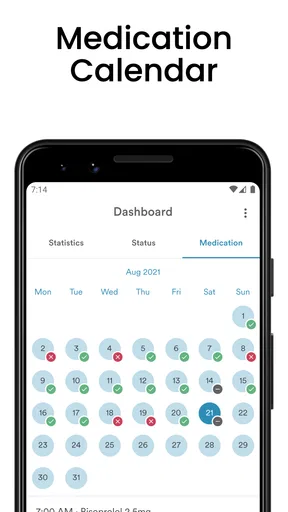
- Custom reminders for medication and checks.
- Secure data storage with cloud backup.
- Integrates with fitness apps seamlessly.
Limitations of AVAX Blood Pressure Diary
- Limited export options for data sharing.
- No option for multiple user profiles.
- Ads in the free version can be distracting.
- Requires manual input of health data.
- Lacks integration with certain smartwatches.
Similar Picks in This Category
View All
WebMD: Symptom Checker
WebMD, LLC4.1

Microphone Amplifier
DOSA Apps4.2

Anatomy Learning - 3D Anatomy
3D Medical OU4.5

Period Tracker and Calendar
SimpleInnovation4.9

GoodRx: Prescription Coupons
GoodRx4.8

CVS Health
CVS Pharmacy4.5
You May Also Like
View All
Frequently Asked Questions
What features does the AVAX Blood Pressure Diary offer to help manage my health?
AVAX Blood Pressure Diary provides comprehensive tools to track your blood pressure and heart rate. It features easy-to-read charts, a history log for monitoring trends over time, and reminders for medication or health checkups. Additionally, it offers data export options for sharing information with your healthcare provider.
Is the AVAX Blood Pressure Diary user-friendly for people not tech-savvy?
Yes, the AVAX Blood Pressure Diary is designed with simplicity in mind, offering an intuitive interface that caters to all users. It includes step-by-step guides for inputting data and setting reminders, ensuring an easy experience even for those who aren’t familiar with technology.
Does AVAX Blood Pressure Diary require any additional hardware to function?
No additional hardware is needed to use the AVAX Blood Pressure Diary. Users can manually enter their blood pressure readings into the app. However, it can sync with compatible smart devices for automatic data entry, enhancing convenience but not mandatory for the app's functionality.
How does the app ensure the privacy and security of my health data?
AVAX Blood Pressure Diary prioritizes user privacy by employing advanced encryption methods to secure your data. The app does not share your information with third parties without consent. Users can also set up additional security measures, such as password protection or biometric logins, to enhance safety.
Is AVAX Blood Pressure Diary available on both Android and iOS, and are there any subscription fees?
AVAX Blood Pressure Diary is available for download on both Android and iOS platforms. It offers a free version with essential features, while premium subscriptions provide additional tools like advanced analytics and ad-free usage. Users can choose the plan that best suits their needs and budget.
